DFM European Defence Funding Navigator
Find the public funding routes your defence or dual-use company can pursue.
The DFM Funding Navigator helps your company understand where it may qualify, what could prevent access, how relevant routes work, what must be prepared and which actions should come next.
See pricing & access Request a free funding assessment See how it works
Already subscribed? Sign in
The Funding Monitor is DFM’s free public intelligence base. The Funding Navigator is the subscription workspace that maps it to your company.
Who this is for
Defence & dual-use SMEs and mid-caps
Companies building defence, security or dual-use technology — from components and software to platforms and services.
Established in the EU or an associated country
Most routes require establishment and executive management in an eligible country. Partner and supplier routes for other companies are flagged for verification, never assumed.
Seeking EU, NATO or national public funding
Grants, procurement, loans and innovation instruments — where the real question is not “what exists” but “which route fits us, and what would block it”.
Funding information is abundant. A company-specific access route is not.
Programme websites list what exists. They do not tell you whether your company’s establishment, ownership and control, project maturity, geography, consortium position and timing make a route worth pursuing. The Navigator maps your specific facts against the programmes so you can see where to focus.
Not ready to buy before discussing your company?
Tell DFM what your company builds, where it is established and which sector you operate in. We will assess — manually and with no obligation — whether the funding routes we map are a realistic fit for your company, without asking for confidential information.
Request a free funding assessment →
A professional product-fit assessment, not free grant-writing or legal advice. Prefer a broader conversation? Make a professional request.
Questions the Navigator answers
How it works
Create the company funding passport
Non-confidential facts only.Add a project
What you would apply with.Assess funding access
Deterministic, explainable matching.Resolve eligibility gaps
Hard gates and material unknowns.Prepare the route
Readiness, consortium, evidence.Track opportunities & changes
Reviewed in-app alerts, calendar, reports.
Typical first setup: approximately 8–12 minutes. Additional detail can be added later.
What your company receives
Your funding-route map
Every mapped programme route assessed against your recorded facts, ranked by result class and priority — so you see where to focus first and why.
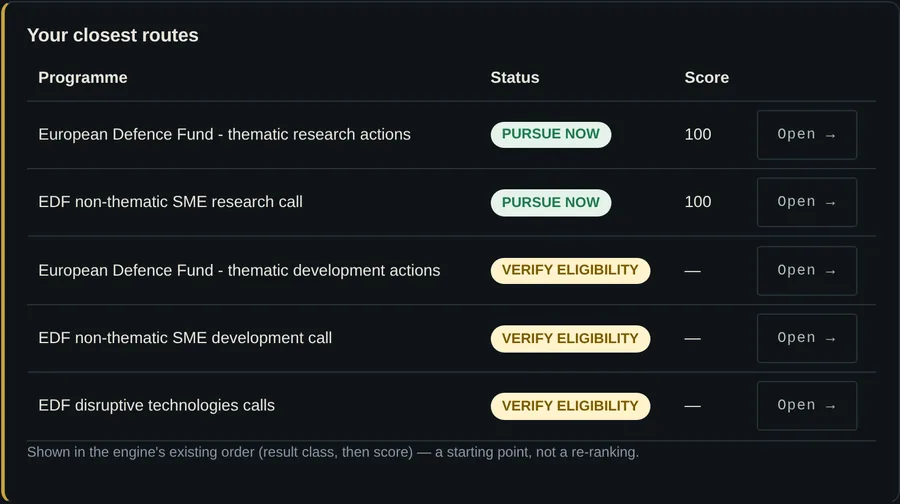
Product preview — fictional example data.
Reviewed current opportunities
Grant calls and procurement notices reviewed against the official source, with budget, funding rate, eligibility and consortium conditions and their verification state — so your team acts on conditions, not headlines.
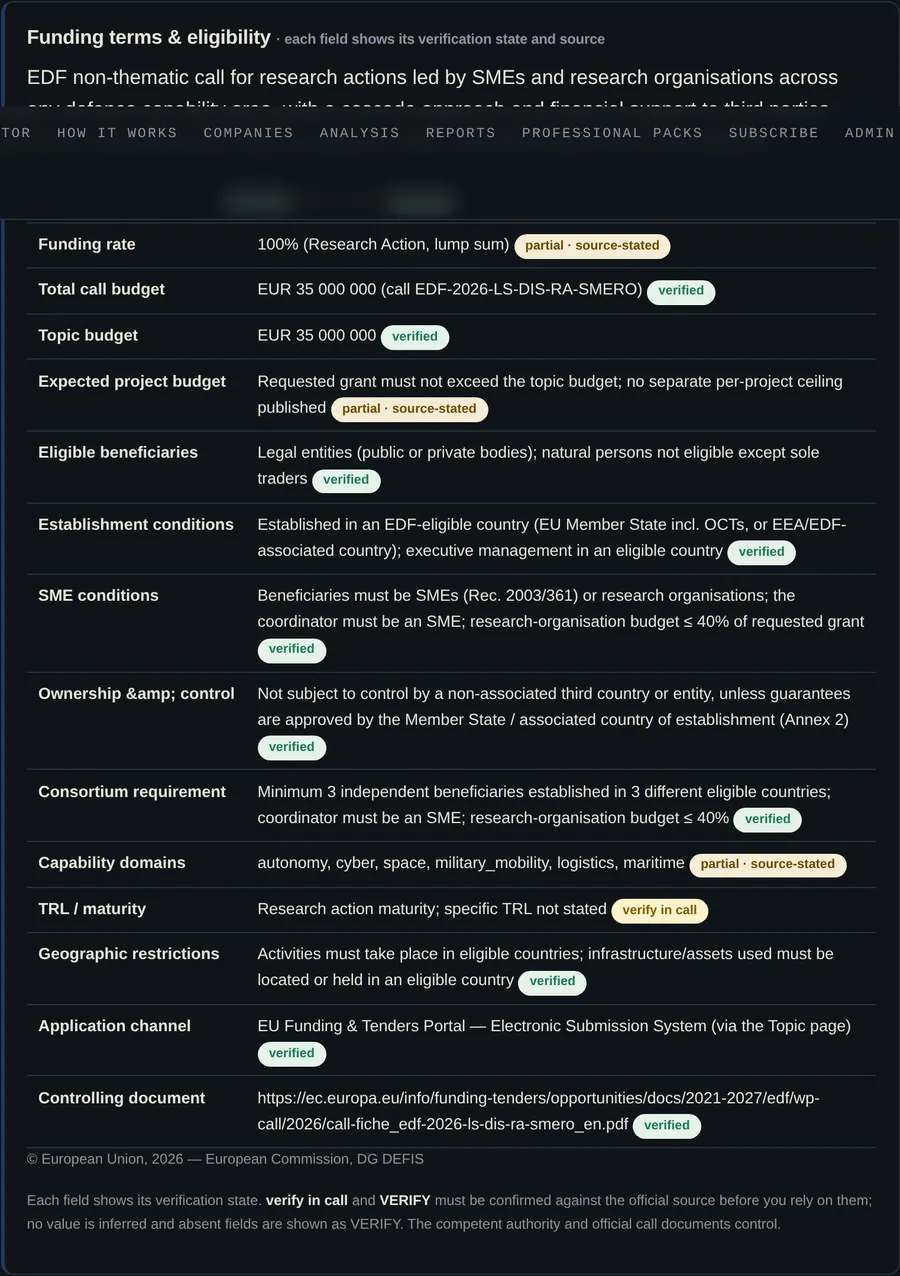
Product preview — fictional example data.
A decision dashboard
One place that says what to do next: your next best action, failed gates, material unknowns and application readiness — so progress never stalls on “what now?”.

Product preview — fictional example data.
Company funding passport
Your eligibility facts recorded once — establishment, SME status, ownership and control — and reused across every route check.
Eligibility barriers & unknowns
What could block each route (hard gates) and which material facts still need confirming — stated, never assumed.
Access-route playbooks
How each programme is actually accessed: authority, instrument, rates, channel — with each field’s verification state.
Application readiness & evidence register
A 30-item readiness checklist and a register of the proof you hold — so gaps surface before a deadline does.
Consortium-role & funding-stack plans
Which role fits you in a consortium, and how instruments could combine across a project.
90-day plan, calendar & in-app alerts
A suggested action sequence, verified deadlines only, and reviewed in-app alerts when something material changes.
Seven versioned management reports
Point-in-time PDF reports your board and advisers can rely on — pinned to the exact data version used. See a sample report (PDF) — generated by the product from fictional example data.
A worked example
Illustrative case from the DFM case library — fictionalised; not a client
Estonian autonomous-systems SME
The company: EU-established SME; TRL 6; autonomous navigation and edge AI; EUR 1.2 million development need; NATO-compatible ownership and control.
The shortlist the Navigator produces: EDF development action · NATO DIANA · Estonian defence innovation channel · EIC Accelerator — each with its gates: challenge fit, consortium role, non-EU components, security plan, test environment, own-cash requirement.
The resulting plan: lead with a DIANA challenge only if operational fit is exact; pursue EDF through a work-package role; use EIC only if the commercial-scale narrative is credible.
How results are prioritised
Scores prioritise your attention. They are not probabilities of eligibility, funding or award.
How the Opportunity Monitor works
Official source checked
Material change detected
DFM review & structuring
Opportunity published
Relevant companies reassessed
Actionable in-app alert delivered
DFM checks selected official sources on a schedule. A page change is not automatically treated as a funding opportunity. For general web pages, the change enters DFM review. Customers see only information that has been reviewed and structured. Published opportunities are versioned, linked to the official source and reassessed when a material deadline, eligibility condition or status changes.
Coverage is selective and not exhaustive. The official call, work programme, procurement notice and competent authority always control.
What is and is not included
Included
- Self-service company and project profiling
- Programme-route matching
- Access-condition analysis
- Selected official-source monitoring
- Reviewed opportunities
- Preparation tools
- Calendar and in-app notifications
- Versioned reports
- A 12-month DFM Analysis subscription
Not included
- Individual consulting
- Legal, financial, tax, state-aid, export-control or procurement advice
- Grant writing
- Application review or submission
- Buyer or consortium introductions
- Document uploads
- Guaranteed eligibility or funding
A public window into the live Funding Monitor
DFM also maintains a public defence-funding intelligence base. Aggregate, non-subscriber figures:
Funding Monitor — public and free. Funding Navigator — the subscription workspace on this page. Explore the public Funding Monitor →
Pricing and access
per organisation workspace · per year · Annual Professional
What’s included
- The full Navigator workspace: funding routes, reviewed opportunities, application readiness, consortium builder, funding stack, 90-day plan, call calendar, in-app alerts and seven versioned reports.
- A 12-month subscription to DFM Analysis — included.
- Colleagues work in the same organisation workspace.
What you get in the first 7 days
- Day 1: activation (manual, usually within one working day) and guided setup — about 10 minutes of your company facts.
- Immediately after setup: your position across the 147 mapped funding routes, reviewed opportunities matched to your facts, and a verified-deadline calendar.
- Within the week: recorded eligibility assessments on your closest routes, your readiness gaps, a 90-day preparation plan and your first versioned report.
- Coverage is selective, not exhaustive — we map what we can verify against official sources, and every claim links to its source.
How access works
- Sign in, then Get annual access — Stripe checkout or bank transfer by invoice.
- DFM verifies the payment and organisation.
- DFM activates the subscription manually — we aim to do this within one working day.
- Your company completes the guided setup and works independently.
Payment never automatically activates access; DFM verifies and activates each subscription manually.
Questions and answers
Do I need funding expertise?
No. The Navigator is written for non-specialists and explains each result in plain English.
How long does setup take?
Typically about 8–12 minutes for the minimum company facts and one project. You can add more later.
Does a high score mean we are eligible?
No. Scores prioritise your attention; they are not probabilities of eligibility, funding or award. The official call always controls.
Why does a route say HOLD?
A hard eligibility gate is not met on your recorded facts — for example an unresolved third-country ownership exposure. Resolve it before pursuing the route.
Why does a route say VERIFY ELIGIBILITY?
A material fact is missing or must be confirmed against the official source before the route can be prioritised. We never assume a favourable answer.
Does DFM find every new opportunity automatically?
No. Coverage is selective, not exhaustive. DFM checks selected official sources on a schedule and publishes opportunities only after review.
Which official sources are monitored?
Selected official EU, NATO and national institutional sources. The Sources & Methodology page lists the active set and last verification.
How current is the information?
Point-in-time. Each programme and opportunity shows its last verification date; the official source always controls.
Can we upload documents?
No. The Navigator never accepts document uploads or classified, restricted or confidential information.
Can colleagues use the same workspace?
Yes — access is per named organisation workspace.
Does the subscription include DFM Analysis?
Yes. A 12-month subscription to DFM Analysis is included and is activated together with your workspace.
Does DFM write or submit applications?
No. The service is self-service decision support; it does not write, review or submit applications.
What happens after payment?
DFM verifies the payment and organisation and manually activates access. Payment never activates access automatically.
What happens when the subscription expires?
Access continues through a short grace period, then ends until renewal. Your recorded facts are preserved.
Data basis: programme edition 1.0 (verified 2026-07-14) · 30 official sources monitored · last monitoring cycle 29 Oct 2026 · full register and methodology inside the product (Sources & methodology).
Build a funding route your team can explain.
Get annual access Request a free funding assessment
Point-in-time decision support. Not legal, financial, tax, state-aid, export-control or procurement advice, and not a guarantee of eligibility, funding or award. The official sources and competent authorities always control.